

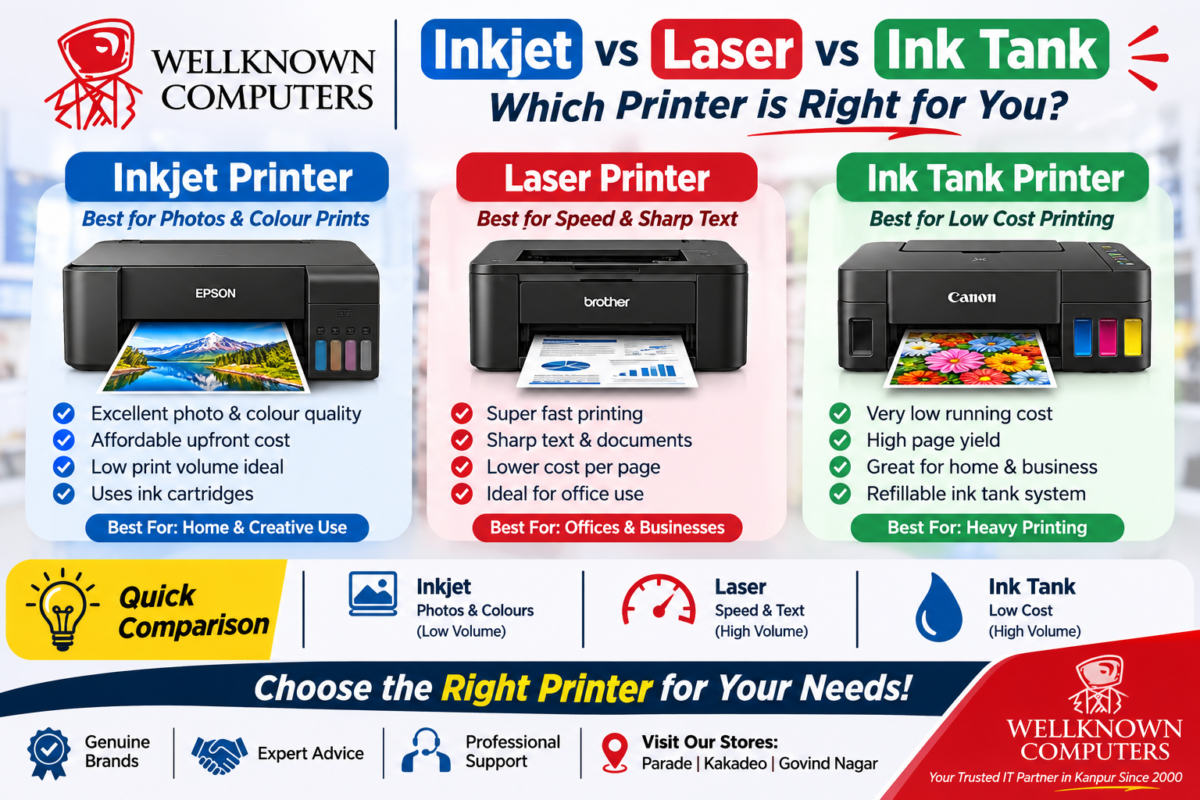
Pick by how much you print and what you print. For occasional printing, a low-price inkjet is enough. For regular colour printing at a low running cost, an ink tank printer is usually the smarter buy. For fast, sharp black-and-white documents in an office, a laser printer is the better fit. Always compare the cost per page and the price of the next refill, not only the sticker price.
Walk into any printer shop and you will hear the same question: “Which one should I buy?” The honest answer is, it depends. A student printing a few assignments a month, a coaching centre printing hundreds of worksheets, and a CA office printing contracts all day need three different machines.
The inkjet vs laser vs ink tank printer question confuses so many people because each type is good at something different, and the cheapest one to buy is often the most expensive one to run. This guide explains the three types in plain language, compares them on cost, quality, speed and upkeep, and tells you which one suits home users, students, offices and shops. We have written it the way we explain it to customers at our counter.
Well Known Computers has been serving customers in Kanpur since 2000.
Well Known Computers Address: 3rd Floor Somdutt Plaza, Kanpur, Uttar Pradesh 208001 Phone / WhatsApp: +91 9305837025 Website: https://wellknowncomputers.com/
Inkjet vs Laser vs Ink Tank Printer: Quick Comparison
| Point | Inkjet (cartridge) | Ink tank (refillable) | Laser |
|---|---|---|---|
How it prints | Sprays liquid ink from cartridges | Sprays ink fed from large refillable tanks | Fuses toner powder onto paper with heat |
Purchase price | Lowest | Medium to higher | Medium to higher |
Printer running cost | Highest per page | Low per page | Low per page for text |
Best for | Occasional home use | Regular colour printing | Fast black-and-white office printing |
Text quality | Good | Good | Very sharp |
Colour and photos | Good | Good | Fine for documents, less suited to photos |
Speed | Moderate | Moderate | Fast |
Upkeep | Ink can dry if unused | Ink can dry if unused, refilling needs care | Toner does not dry, some models need a drum replaced |
Main weakness | Costly refills | Higher upfront price, bigger body | Higher upfront price, colour models cost more |
These are general tendencies. Individual models differ, so always check the specifications of the exact printer you are considering.
How Each Printer Works
Inkjet printers
An inkjet printer sprays tiny drops of liquid ink onto paper through very fine nozzles. Ink comes in small cartridges. Because the machine itself is simple and cheap to make, inkjets have the lowest purchase price. The catch is that cartridges hold little ink and cost a lot per page. If the printer sits unused, the ink can dry in the nozzles and cause streaks or blockages.
Ink tank printers
An ink tank printer also sprays ink, but it draws it from large tanks that you refill from bottles instead of replacing cartridges. A single bottle prints many pages, so the cost per page is usually much lower. The printer costs more to buy and is often bulkier. Refilling needs a little care to avoid spills, and you should follow the manufacturer’s instructions.
Laser printers
A laser printer uses toner, a fine powder, which is attracted to the page and then fused with heat. Toner does not dry out, so a laser is a good choice if you print in bursts, with long gaps. Laser printers are fast and produce very sharp text, which is why offices favour them. Some models also use a separate drum that eventually wears out and needs replacing.
Printer Running Cost and Cost Per Page
In any inkjet vs laser vs ink tank printer comparison, the printer running cost decides who wins over time. The number that matters is the cost per page.
How to work it out: divide the price of a cartridge, ink bottle or toner by the number of pages it is rated to print.
Simple illustration, not a real price: if a refill costs ₹500 and prints 500 pages, the cost per page is ₹1 according to the current market price. If another refill costs ₹300 and prints 150 pages, the cost per page is ₹2. The second printer may have been cheaper to buy, but it costs twice as much per page.
Remember these points:
- Page yield is tested under standard conditions, so real results can be lower, especially with heavy colour.
- Colour costs more than black and white in every type.
- Add other costs. Paper, a replacement drum or parts, service, and wasted prints all add up.
- Check supply availability. A cheap printer with hard-to-find refills becomes expensive.
- Think about how much you print. If you print five pages a month, running cost barely matters, and a cheap inkjet is sensible. If you print hundreds of pages, running cost matters more than the purchase price.
Print Quality and Speed
Text: laser printers produce the crispest text, and good inkjet and ink tank printers are very acceptable for everyday documents.
Colour and photos: inkjet and ink tank printers generally do better with colour pictures and graphics. Laser colour printing is clean and fast for office documents such as charts and presentations, but photo lovers usually prefer ink-based printers.
Smudging: laser prints are generally resistant to smudging from water. Some inks can smear when wet, so keep this in mind for documents that may get damp. Ask about the ink type for the models you consider.
Speed: laser printers are usually the fastest, which is a big advantage when many people share one machine. Inkjet and ink tank speeds are enough for home and light office use.
Ink Tank Printer vs Laser Printer: Which Is Better?
This is the comparison that most home offices and small businesses face, since both have a low running cost.
- Choose an ink tank printer vs laser printer when you need colour printing at a low cost, such as school projects, presentations, flyers and photos. It can also handle black-and-white documents.
- Choose a laser printer when most of your printing is black-and-white text, speed matters, and several people print every day.
- If you print mostly text but want colour now and then, a mono laser plus occasional outside colour printing, or an ink tank printer, are both sensible.
In short, the ink tank printer vs laser printer decision comes down to whether colour or speed matters more to you.
Best Printer for Home Use
For the best printer for home use, think about who prints and how often.
- Light, occasional use: a compact inkjet all-in-one is affordable and enough for forms, a few school projects and the occasional photo.
- Regular family printing, with colour: an ink tank all-in-one pays for itself through low refill cost.
- Mostly black-and-white pages: a small mono laser is fast and its toner does not dry out.
Also consider wireless printing if you print from phones and laptops, and think about where the printer will sit, since ink tank models are often larger.
Printer for Students
A printer for students needs to be simple, affordable and low maintenance. Most students print assignments, notes and project reports, with a bit of colour for charts and covers.
- A few pages a month: a basic inkjet is enough, but print a test page every week or two so that the ink does not dry out.
- Regular assignments and projects: an ink tank printer saves money over a semester.
- Shared hostel or home use: wireless printing and an all-in-one with scanning are handy.
- Tight budgets: it can be cheaper to print a few pages occasionally at a shop. Check how much you really print before you buy.
Best Printer for Office
The best printer for office use depends on team size and volume.
- Small office, a few people: an all-in-one laser or ink tank printer with wireless or network connection.
- Busy office, black-and-white documents: a mono laser printer with duplex (two-sided) printing and a high monthly duty cycle.
- Offices that need colour: a colour laser or a high-volume ink tank printer, depending on speed and cost.
- Document-heavy work (CA, legal, consulting): a laser all-in-one with an automatic document feeder for scanning and copying.
- Network and security: a networked printer should have a changed default password and updated firmware, and sit behind a firewall. See our guide on what a UTM firewall is.
- Scanned documents: include them in your regular backup. Read our guide on data backup for small business.
Check the monthly duty cycle, which tells you how many pages a printer is designed to handle. A home model used at office volumes will wear out quickly.
Shops, Schools, Clinics and Other Uses
| Use | Suggested type |
|---|---|
| Shop billing | Thermal receipt printer (no ink), with a label printer for barcodes |
| Schools and coaching centres | High-volume ink tank or laser for worksheets and notices |
| Clinics and labs | Laser all-in-one for reports, plus a thermal printer for receipts |
| Photographers and designers | Photo-capable ink-based printers |
| Multi-copy carbon invoices | Dot matrix printer |
All-in-One Printer: Is It Worth It?
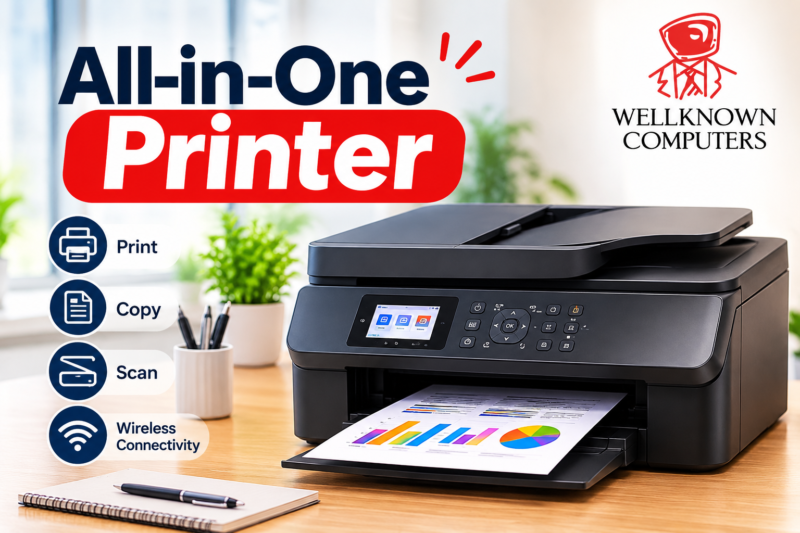
An all-in-one printer prints, scans and copies, and some also fax. It is useful at home for scanning documents and at offices for copying forms. Look for these features:
- Automatic document feeder (ADF) for scanning or copying multi-page documents.
- Duplex printing to save paper.
- Wireless and mobile printing.
- Scan to computer or email.
The trade-off is size and a slightly higher price. If you never scan or copy, a simple printer is enough. If you do, an all-in-one printer saves space and money compared with buying a separate scanner.
Features to Check Before You Buy
- Print speed (pages per minute)
- Resolution for fine text and photos
- Duplex printing
- Wireless and network connectivity
- Paper tray capacity and paper sizes (A4 only or A3 too)
- Monthly duty cycle
- Availability and price of ink or toner
- Size, noise and power use
- Warranty and local support
Care, Maintenance and Longevity
- Print regularly if you use an inkjet or ink tank printer. A test page every week or two helps prevent clogged nozzles.
- Use the right paper and keep it dry to avoid jams.
- Keep the printer covered and dust-free.
- Use the supplies recommended for your model. Non-recommended supplies can cause error messages or may affect the warranty.
- Handle ink bottles carefully and follow the instructions to avoid spills.
- Install updates and drivers from the manufacturer.
- Use a UPS or surge protection to protect against power cuts and voltage changes.
A well-maintained printer can serve for years, whichever type you choose.
Common Mistakes in the Inkjet vs Laser vs Ink Tank Printer Decision
- Choosing on purchase price alone. Running cost matters more over time.
- Ignoring page yield and the next refill’s price.
- Buying an inkjet for heavy use. Cartridges will drain your wallet.
- Buying an ink tank printer and then barely using it. Ink can dry out, and the higher price will not pay off.
- Choosing a laser for photos. Ink-based printers usually suit pictures better.
- Forgetting the monthly duty cycle.
- Not asking about supplies and service.
- Skipping the demo. Always see a test print.
Quick Decision Guide
Use this short guide to settle the inkjet vs laser vs ink tank printer question.
- Print a little, occasionally: inkjet or inkjet all-in-one.
- Print regularly in colour: ink tank printer.
- Print mostly black-and-white documents in large amounts: laser printer.
- Need scanning and copying: all-in-one printer.
- Need bills and labels: thermal printer.
- Not sure: tell us what you print and how much, and we will help you decide.
Printers We Offer at Well Known Computers
You can compare an inkjet vs laser vs ink tank printer side by side at our store in Kanpur, see test prints and ask about running costs before you decide.
- Inkjet and ink tank printers for home and office
- Laser printers, mono and colour
- All-in-one printers with print, scan and copy
- Thermal receipt, label and barcode printers for billing
- Dot matrix printers for multi-copy invoices
- Ink, toner and other supplies
- Brands we deal in: (Canon, HP, Epson, TVS)
Who we serve [confirm and edit]: homes and students, small businesses and shops, offices and professionals, schools and coaching centres, clinics and laboratories.
For more help choosing a seller, read our guide to printer dealers in Kanpur. We also stock webcams, bags and other accessories from several trusted brands.
Visit us: 3rd Floor Somdutt Plaza, Kanpur, Uttar Pradesh 208001 | Call / WhatsApp: +91 9305837025 | Website: https://wellknowncomputers.com/
Frequently Asked Questions
Inkjet vs laser vs ink tank printer: which is cheapest to run?
For regular printing, ink tank printers and laser printers usually cost less per page than cartridge inkjets. Ink tank models tend to be cheapest for colour, and laser printers are economical for large volumes of black-and-white text. Compare the cost per page for the exact model.
Which is the best printer for home use?
For most homes, a compact all-in-one inkjet or an ink tank printer works well. Choose an ink tank model if you print regularly in colour, and a simple inkjet if you print only occasionally.
Which is the best printer for office use?
For black-and-white documents in volume, a laser printer with duplex printing and a high duty cycle is a common choice. For offices that need colour at a low cost, consider a colour laser or a high-volume ink tank printer.
Ink tank printer vs laser printer: which is better?
Choose an ink tank printer when you print colour regularly and want a low running cost. Choose a laser printer when you print mostly black-and-white pages and need speed, especially with several users.
Which printer is best for students?
A simple inkjet all-in-one is enough for occasional printing, while an ink tank printer saves money for regular assignments and projects. Wireless printing is useful if you print from a phone or laptop.
What is cost per page, and how do I calculate it?
Cost per page is the price of a refill (ink or toner) divided by the number of pages it is rated to print. It lets you compare printers fairly, since a cheap printer with expensive refills can cost more in the end.
Is an all-in-one printer worth it?
Yes, if you scan or copy documents regularly. An all-in-one printer saves space and money compared with buying a separate scanner and copier. If you only print, a simple printer is enough.
Does ink dry out if I do not use the printer?
Yes, in inkjet and ink tank printers unused ink can dry in the nozzles and cause streaks or blockages. Print a test page every week or two. Laser toner does not dry out.
Can I use compatible ink or toner?
Some printers work with compatible supplies, while others show error messages or may affect the warranty. Follow the manufacturer’s guidance and ask your seller what suits your model.
Kaun sa printer lena chahiye: inkjet, laser ya ink tank?
Kam printing ke liye simple inkjet, regular colour printing ke liye ink tank, aur office ki fast black-and-white printing ke liye laser lo. Kharidne se pehle cost per page aur agle refill ki price zaroor poochho. Store par aakar demo dekho.
Need Help Choosing? Talk to Our Team
If the inkjet vs laser vs ink tank printer choice still feels confusing, tell us what you print and how much, and we will recommend the right type and explain the running cost honestly.
Well Known Computers Address: 3rd Floor Somdutt Plaza, Kanpur, Uttar Pradesh 208001 Call / WhatsApp: +91 93358 37020 Website: https://wellknowncomputers.com/































Recent Comments